A new website can look better, load faster and feel more professional while still leaving the business worse off than before.
That usually happens when the redesign looks at design first and SEO second.
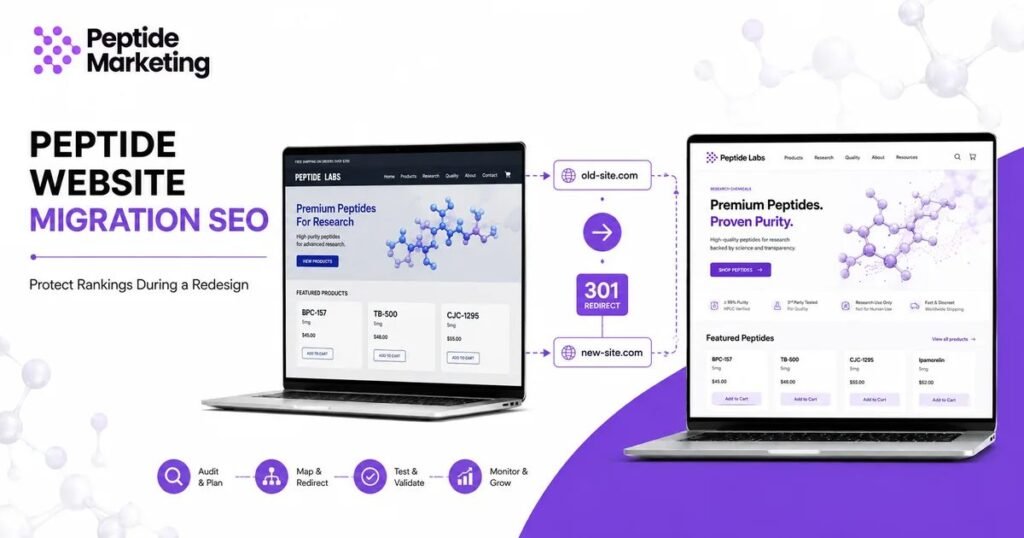
A proper peptide website migration SEO plan protects the pages, URLs, internal links, backlinks and tracking that are already creating value while giving you room to improve the website.
Without that planning, a redesign can accidentally remove pages that rank, change important URLs, break links or prevent search engines from accessing parts of the new site.
If you are still deciding whether your current site actually needs rebuilding, start with our Peptide Website Redesign guide.
If you are not sure what is wrong with the current website in the first place, use the Peptide Website Audit checklist before making major changes.
Once the decision to rebuild has been made, follow this process:
Audit → Map → Redirect → Test → Launch → Monitor
That simple sequence can prevent a lot of expensive mistakes.
Why Can a Website Redesign Hurt SEO?
Google does not penalize a business simply because it redesigns its website.
The problems normally come from what changes during the process.
Imagine that an existing page has been ranking for a useful keyword for two years.
During the redesign, somebody decides the URL looks messy and replaces it with a cleaner one.
The old URL disappears.
No redirect is added.
Any authority, backlinks and search visibility associated with that URL now have nowhere useful to go.
Multiply that across 20, 50 or 100 pages and the new website can launch with a serious SEO problem.
Other common migration mistakes include:
- Removing useful content
- Changing page titles without a reason
- Forgetting internal links
- Accidentally leaving pages set to noindex
- Blocking crawling
- Losing structured data
- Removing canonical tags
- Changing site architecture
- Breaking analytics
- Forgetting conversion tracking
Good Peptide SEO should therefore be part of a redesign before development begins, not something added after launch.
1. Crawl the Existing Website Before You Change It
Before touching the current website, create a record of what already exists.
You want a list of:
- Current URLs
- Page titles
- Meta descriptions
- H1 headings
- Canonical URLs
- Status codes
- Internal links
- Indexable pages
- Images
- Redirects
This becomes your baseline.
Without it, it is surprisingly easy for useful pages to disappear during development.
Also review Google Search Console and analytics to identify which pages currently receive organic traffic.
A page may not look particularly important from a design perspective, but if it consistently attracts qualified search visitors, deleting it without analysis would be a mistake.
You can access Google Search Console to review current search performance before the migration begins.
2. Identify the Pages Already Creating Value
Not every URL deserves equal protection.
Focus first on pages that already have:
- Organic traffic
- Keyword rankings
- Backlinks
- Leads
- Sales
- Useful internal links
- Strong engagement
These pages are assets.
They should not automatically be rewritten, renamed or removed simply because the website is being redesigned.
For example, if one of your educational articles already attracts relevant search traffic, the redesign should preserve what makes that page useful.
Likewise, if a service or category page ranks for an important commercial term, changing its URL should require a clear reason.
This is where a Peptide Website Audit and migration plan should work together.
The audit tells you what needs improvement.
The migration plan protects what does not need to be destroyed.
3. Keep Existing URLs Whenever It Makes Sense
One of the easiest ways to reduce migration risk is simple:
Do not change a good URL without a good reason.
If a page currently lives at:
example.com/peptide-seo/
and the topic remains the same after the redesign, there may be little benefit in changing it to:
example.com/services/digital-marketing/search-engine-optimization/
A prettier URL is not automatically a better business decision.
Keeping important URLs means search engines, visitors and external websites can continue reaching the same content without needing additional redirects.
Sometimes URL changes are necessary because products have changed, categories are being reorganized or the old architecture genuinely no longer makes sense.
That is when redirect mapping becomes critical.
4. Build a 301 Redirect Map Before Launch
Never wait until the new site is live to figure out redirects.
Create a spreadsheet with at least two columns:
| Existing URL | New URL |
|---|---|
| Old page A | New equivalent page A |
| Old page B | New equivalent page B |
| Old category | New category |
Each important old URL should point to the most relevant replacement.
Avoid sending every deleted page to the homepage.
If an old page about a specific topic has been replaced, redirect it to the closest equivalent page.
When URLs genuinely change permanently, use appropriate permanent redirects.
Google provides additional guidance in its official documentation on site moves with URL changes.
The key point is to create the redirect map before launch, test it, and then check it again after the new website goes live.
5. Protect Important Content During the Redesign
A redesign often creates pressure to make pages shorter because cleaner layouts look attractive in a design mockup.
Be careful.
Some of the content that seems visually inconvenient may be helping the page answer search intent.
Do not remove useful information simply to make a page look minimal.
Instead, improve its structure.
Use:
- Clear headings
- Shorter paragraphs
- Better visual hierarchy
- FAQs
- Tables
- Accordions where appropriate
- Helpful internal links
The objective is not to preserve every sentence from the old website.
It is to understand why a page performs before changing it.
The same principle applies to title tags, H1 headings and descriptions.
Improve weak elements, but avoid rewriting everything blindly just because the website is new.
6. Rebuild Internal Links Carefully
Internal links are easy to lose during migrations.
A new theme may replace menus.
Old articles may still contain links pointing through unnecessary redirects.
Navigation structures can change.
Related-content sections may disappear.
Before launch, review how important pages connect.
For Peptide-Marketing, for example, an article discussing website conversions should logically connect readers to Conversion Rate Optimization or relevant website-development content.
An article about traffic acquisition can naturally lead to Peptide SEO vs Paid Ads.
Likewise, someone learning about conversion problems may benefit from Peptide Landing Page Optimization.
Internal links are not just an SEO task.
They help people move from a question to a solution.
7. Check Canonicals, Indexing and Robots Settings
This is one of the most important pre-launch checks.
Development websites are often intentionally blocked from search engines while they are being built.
That is normal.
The problem occurs when those restrictions accidentally move to the live site.
Before launching, review:
- Robots.txt
- Meta robots settings
- Canonical tags
- WordPress search engine visibility
- Rank Math indexing settings
- Password protection
- Development environment restrictions
Important live pages should not accidentally contain a noindex instruction.
The canonical URL should also normally point to the correct live version of the page.
Do this check again immediately after launch.
8. Generate and Submit the New XML Sitemap
Once the new website is live, confirm the XML sitemap contains the pages you actually want search engines to discover.
Remove obsolete or redirected URLs from the sitemap.
Then submit or verify the sitemap in Google Search Console.
For a WordPress site using Rank Math, the sitemap will normally be available through your sitemap index.
The sitemap does not replace good internal linking, but it gives search engines another clear way to discover the current site structure.
9. Test Speed and Mobile Experience
A redesign should improve the user experience, not simply make the website prettier.
Test the important page templates on real mobile devices.
Pay particular attention to:
- Navigation
- Product pages
- Forms
- Buttons
- Checkout
- Popups
- Tables
- Images
- Sticky elements
Also test performance using Google PageSpeed Insights.
You do not need to chase a perfect score simply for bragging rights.
Focus on whether real visitors can access and interact with important content without unnecessary delays or layout problems.
If the previous site struggled with site-wide performance, Peptide Website Design and Development should address those issues at the structural level rather than reproducing them in a prettier theme.
10. Make Sure Conversion Paths Still Work
SEO migration is not successful if rankings survive but leads disappear.
Test every important action.
That includes:
- Contact forms
- Quote forms
- Booking buttons
- Email signups
- Checkout
- Add-to-cart buttons
- Phone links
- Lead magnets
- Thank-you pages
A website exists to support business outcomes, not just rankings.
If your existing site attracts visitors but struggles to turn them into opportunities, read Why Most Peptide Websites Fail to Convert Visitors.
A redesign is the right time to fix those conversion paths rather than carrying old problems into the new website.
11. Verify Analytics and Conversion Tracking
Before launch, document what is currently being tracked.
After launch, verify it again.
Check whether you can still measure:
Visitor → Lead → Qualified Lead → Conversation → Customer
This becomes especially important if you are running paid acquisition.
A redesigned site receiving traffic through Meta and Google Ads needs reliable conversion tracking so you can distinguish real business outcomes from clicks and impressions.
Also test:
- Google Analytics
- Google Search Console
- Advertising pixels
- Form tracking
- Booking conversions
- Ecommerce events
- Thank-you pages
Do not assume tracking survived the migration simply because the website looks correct.
12. Monitor the Website Closely After Launch
Migration work does not finish the moment the new website goes live.
The first few weeks matter.
Monitor:
- Organic clicks
- Organic impressions
- Important keyword positions
- Indexing
- 404 errors
- Redirects
- Crawl issues
- Conversion rates
- Leads
- Revenue where relevant
Some ranking movement after a major migration can happen while search engines process changes.
The bigger concern is a sustained decline combined with technical problems.
If traffic falls sharply, investigate before making another round of unnecessary changes.
Look at what actually changed.
Was an important page removed?
Did a redirect fail?
Is a page no longer indexed?
Did internal links disappear?
Did the content change significantly?
Data should guide the response.
Peptide Website Migration SEO Checklist
Before launching the new site, confirm:
| Migration Check | Status |
|---|---|
| Existing website crawled | ☐ |
| Ranking pages identified | ☐ |
| Important URLs preserved | ☐ |
| Redirect map completed | ☐ |
| Important content reviewed | ☐ |
| Internal links checked | ☐ |
| Canonicals verified | ☐ |
| Noindex settings checked | ☐ |
| XML sitemap generated | ☐ |
| Mobile site tested | ☐ |
| Speed tested | ☐ |
| Forms tested | ☐ |
| Analytics verified | ☐ |
| Conversion tracking verified | ☐ |
| Search Console checked | ☐ |
Planning a Peptide Website Redesign?
Before changing URLs, templates or site architecture, let us review the migration plan for potential SEO and conversion risks.
Book Your Free 30-Minute Website Migration Review
Frequently Asked Questions
Can a website redesign hurt SEO?
Yes, but usually because important URLs, content, links or technical settings were changed incorrectly rather than because the site was redesigned. A planned migration can significantly reduce that risk.
How do I redesign a website without losing rankings?
Audit the current website first, identify valuable pages, preserve URLs where possible, create 301 redirects for URLs that must change, maintain useful content, rebuild internal links and test indexing before and after launch.
Should URLs change during a website redesign?
Not automatically. If an existing URL is relevant and performing well, keeping it is often the simpler option. Change URLs when there is a genuine structural or business reason.
What type of redirect should be used when a page permanently moves?
A permanent server-side redirect, commonly a 301 redirect, is generally appropriate when an old URL has permanently moved to a new equivalent location.
How long does SEO take to recover after a website migration?
There is no universal recovery period. It depends on the size of the site, the scale of the changes and how well the migration was handled. A carefully planned migration may experience limited disruption, while serious technical mistakes can create longer-lasting problems.
Audit → Map → Redirect → Test → Launch → Monitor
A website migration does not need to be complicated, but it does need to be planned.
First, understand what already works.
Then decide what genuinely needs to change.
Protect valuable URLs and content.
Map redirects.
Test the website.
Launch carefully.
Then monitor real search and conversion data.
That process gives your redesign a much better chance of improving the website without throwing away the visibility it has already earned.
Peptide-Marketing helps peptide businesses combine website development, SEO and conversion strategy so a redesign supports growth rather than simply changing how the website looks.